





Is ShopMy Worth It? A Full-Time Blogger’s Honest Take
There has been a lot of discussion about ShopMy, a relatively new platform on the scene for creators and shoppers. I've been blogging for over 20 years, been monetizing it since almost the beginning, and got into affiliate sales in the late 2000s. I want to share my experience with ShopMy, what I like about it, what bothers me about it, and how I use it as a blogger and social media content creator.
Please know there are affiliate links in this post, including my referral links for ShopMy. If you use one of these links and make a purchase or sign up, I may make a commission.
TL;DR
The Quick Version
This is a very long article geared towards fellow creators interested in using ShopMy or wanting help with using this creator platform. For my regular audience, hang tight, I'll be back to regular style advice content tomorrow. That being said, I think it is important to be an informed consumer and this is one of the many ways I and other content creators make money.
While many of us may call ourselves content creators or influencers or digital producers or bloggers, we all run our businesses differently. Let me share a description of my business and how I run it so you can understand how I use ShopMy and its tools.
CURIOUS ABOUT SHOPMY?
If you are interested in joining ShopMy for creators, I would be honored if you use my referral link.
If you are a shopper and curious about ShopMy, I thank you in advance for using my referral link to check it out.
My Experience as a Full-Time Professional Blogger and Content Creator
In 2005, I began a blog, envisioning each blog post was a different chapter in a style advice book. Soon after, I started a second blog where I journaled my work outfits. All of it started as a hobby, but within a year, I had brands offering to send me free things. Within three years, I had ads on my sites and was using affiliate links to earn a few cents per click or purchase.
In 2014, I merged both of these blogs together into what is Wardrobe Oxygen today. At that time, I also moved from Blogger/Blogspot to WordPress. Almost a decade into blogging, I began to take it more seriously, and also leaned more into social media. By 2016, I was making more from Wardrobe Oxygen than I was at my job as a project manager for a government subcontractor. At the end of 2017, I quit my day job and have worked solely for myself since.
My business is still primarily this blog. However, I do have multiple social media platforms, an email list, and a Substack. They are mainly used to bring traffic back to this site, as this is the part of the job I love the most: writing, sharing advice, being helpful, and creating a community.
When I quit my day job, I leaned hard into social media and sponsored posts and paid opportunities with brands. But when the pandemic happened, I saw the change in this creator world, and decided to focus again on my content, my audience, and what makes me different from my peers. I went from almost 50% of my money coming from brand partnerships (Reels, sponsored posts, UGC, etc.) to about 10%. However, because I invested in my site, my email list, and my community, I was able to supplement and even increase my income with affiliate and ad revenue.
I steadily increased my revenue from 2016 to 2023. My mom passed at the end of September 2023 and the following two years my heart wasn't in the business. I was doing a lot of soul searching, and with the change in our country, wondering my purpose and future in digital content. My income was affected, but not as much if I had still relied on brand partnerships. Having a blog with ads and affiliate links is security; you make money every day, even if you aren't online.
Allie got her groove back in 2026, and I am enjoying this job again, with a new sense of purpose. I am creating the content I wish to see in this world, and doing the renovations on this site I have wanted to do for years. And I want to share what I have learned and how I have achieved success.
When I went to college, I didn't use a computer. I learned everything from Google and being curious. There is so much gatekeeping, smoke and mirrors in this industry. If we all have the same information and tools, then the creators with actual talent will rise to the top. This benefits not only the hardworking talented folk, but our audiences. Less AI slop, fewer filters and lies, more trust, more support, more authenticity, more community.
Why I Use ShopMy for Wardrobe Oxygen
I like ShopMy because it isn't trying to be a get rich scheme for folks doing Amazon hauls and shilling protein shakes. It is a site for curators, not creators, and benefits those who have true audiences and a unique perspective. It is not trying to make me a clone of another creator in Dallas or Salt Lake City, it is not pushing me to be on TikTok or film every minute of my day. If you take offense to anything I wrote in this paragraph, ShopMy may not be for you. And that's okay, there is Amazon, and Mavely, and LTK, and BrandCycle, and TikTok Shop and so many other platforms.
But if you have been on another platform and feel ignored even though you have been successful, if you wish there was more transparency on sales and profits and transactions, if you want closer relationships with brands, and if you want to get off the SponCon treadmill and build a community of people who trust your recommendations… ShopMy vs. LTK may be right for you.
ShopMy for creators requires a referral to join; if you haven't gotten one from another, here is the link to my referral. Do know folks are giving out their referral links because we can profit from it. If you use ShopMy well, we make a commission off your commissions. Knowing this, I used the link of someone I respected as a thank you to sign up; I encourage you to do the same.
Building Your Shop in ShopMy
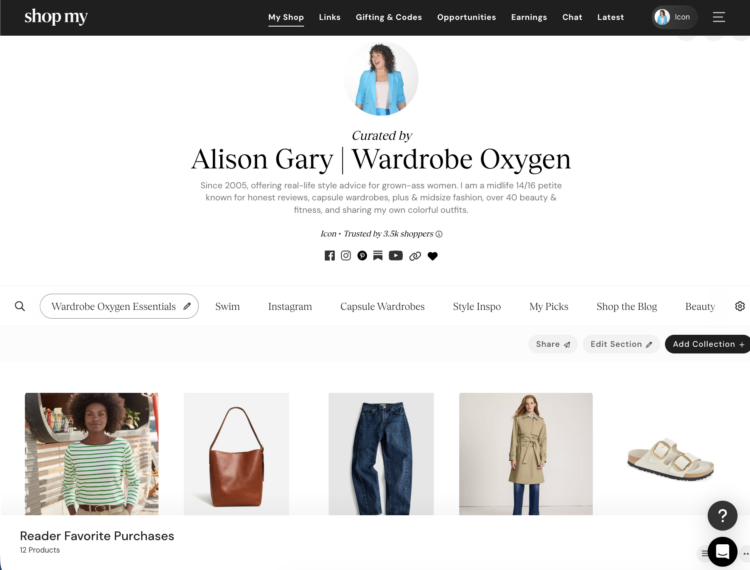
With the ShopMy platform, you create a “shop.” For those with Amazon storefronts, this may feel kind of familiar. Add a profile photo, create a bio, link to your different platforms, and create different tabs for your shop. As you see in the link above and if you visit my shop (link), I have tabs/sections for Wardrobe Oxygen Essentials, Swim, Instagram, Capsule Wardrobes, Style Inspo, My Picks, and more.
- Your tabs relate to your platforms and your kind of content. Beauty, home, family, productivity, travel, whatever. Focus on your niche and what you're known for. For example, if you're a travel blogger but you're also known for curly hair and running marathons, have a tab for curly hair and one for marathon musts as well as ones for categories of items you recommend (summer travel, cruises, winter travel, whatever makes sense).
- Create a tab for your Instagram and/or TikTok. If you have a YouTube, create one for that as well. The TikTok and Instagram ones you can upload directly from your platform an image from your post or story and link to the relevant items. For YouTube, you can make a shelf for each video using a screenshot of the video and the title of the video.
I recommend building your shop on a computer, not your phone. It can be done on a phone, but it's far easier on a laptop and then you can easily add and modify from your phone. Know you can keep anything in your shop hidden until you feel it is ready to be visible to others. Play, modify, get comfortable before launching.
Creating Sections in your ShopMy Shop
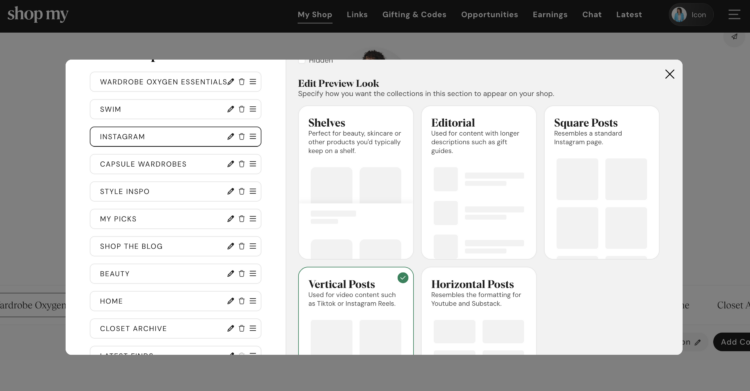
When you create your tab (ShopMy calls them sections), you can choose the name, the order in which it is listed, and also how it will look.
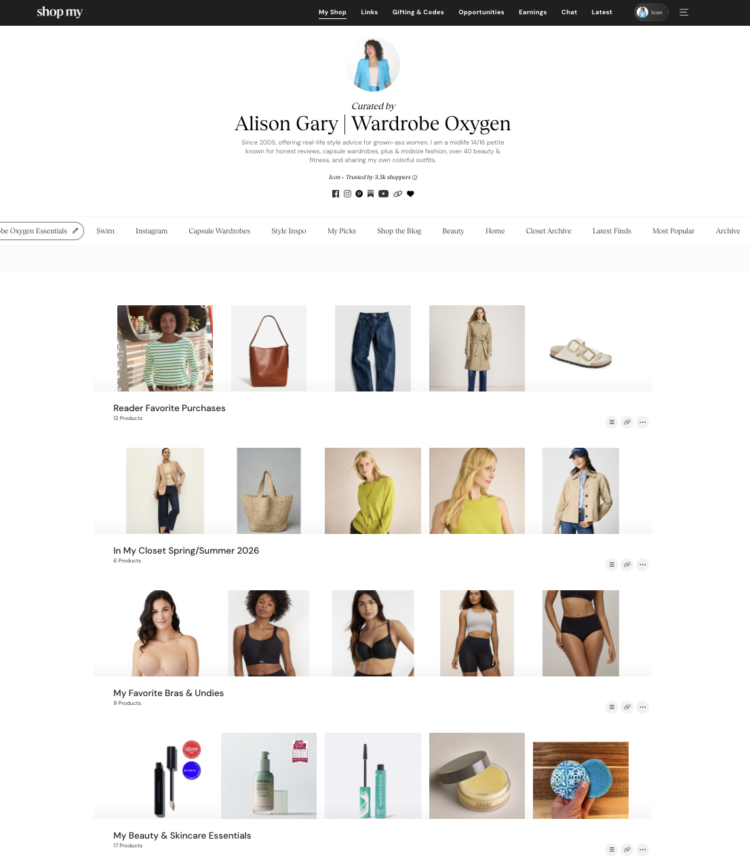
For example, my tab/category “Wardrobe Oxygen Essentials” is set up as “shelves.” You can see the first few items, it's good for focusing on product.
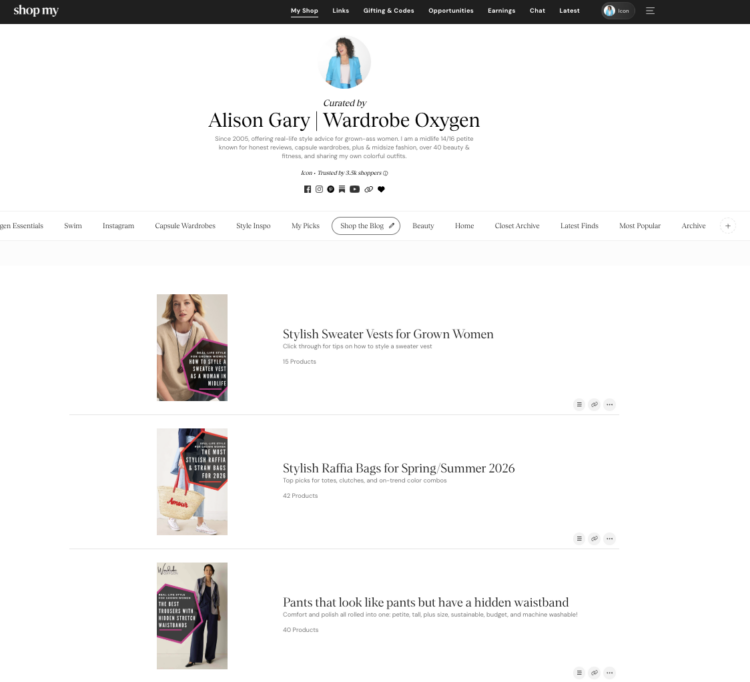
This is my “Shop the Blog” tab/category, and for it I used the “Editorial” layout. I used the featured photo of each blog post, have a title and description that is informative (and also good for SEO), and then you click for the actual items.
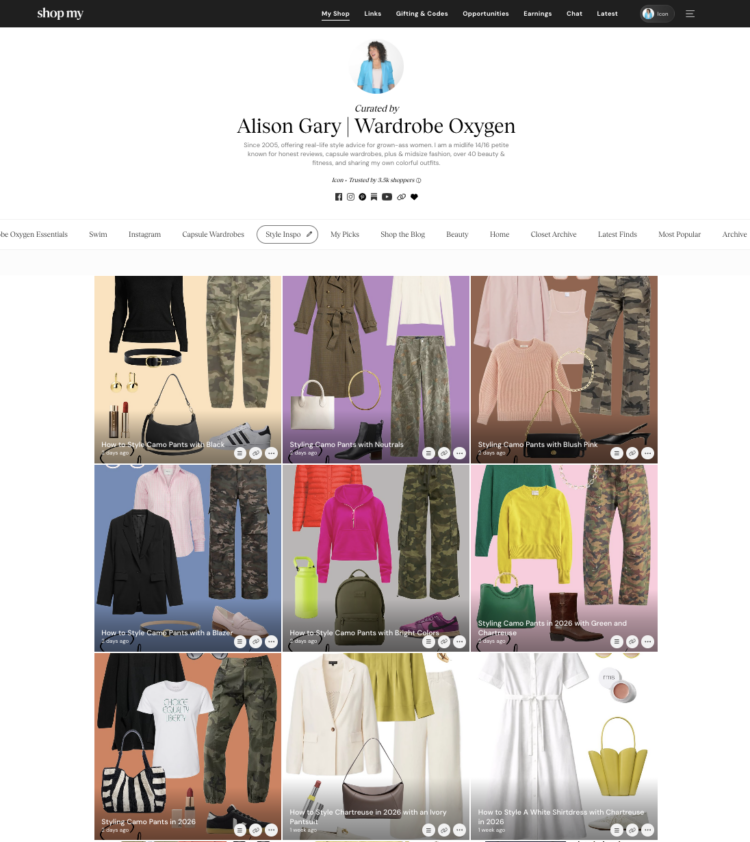
My “Style Inspo” category uses the “Square” layout. This is where I house collages I have created for Instagram, Weekend Reads, various blog posts, and even my best-performing items from LTK are also uploaded here.
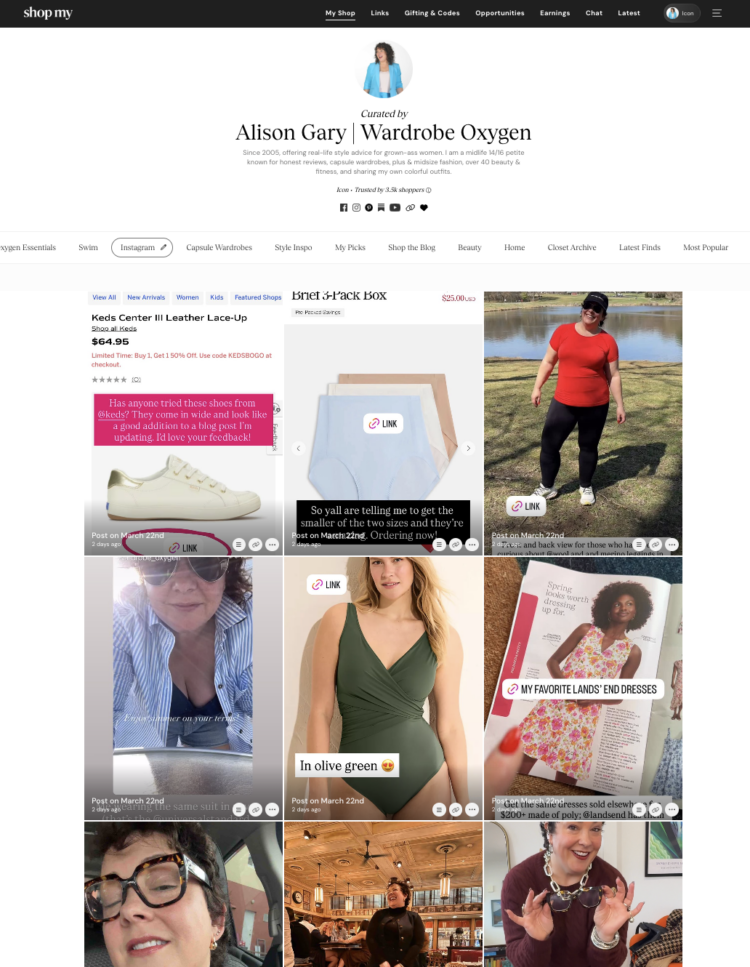
And here is my “Instagram” tab, which is vertical posts. You can see it is a mix of Stories and in-feed content. It isn't the prettiest category on my shop, but it proves extremely useful. Speaking of use…
How to Build a Shelf in ShopMy
Now you have your sections, let's build a shelf! I recently wrote a blog post about wide width comfort sneakers, let's do a shelf in my “Shop the Blog” section:
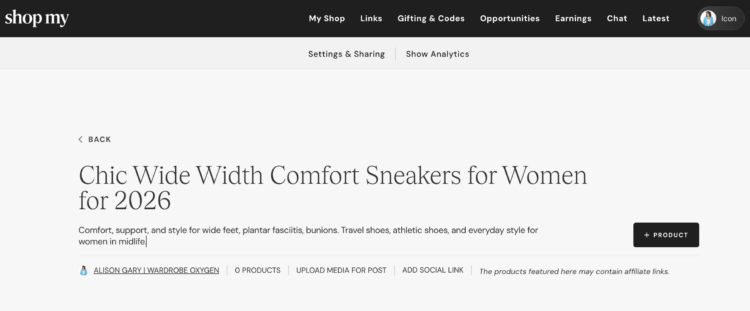
In the top right corner of your section/tab there is a button that says “Add Collection.” Tap that and you will come to a screen that looks like the screenshot above.
- Name your collection something not terribly long but informative (I used the title of the blog post).
- Describe your collection; I have found that Google picks up ShopMy shelves so without keyword stuffing, describe in a way that will attract the right audience.
- If you have a related blog post, YouTube video, Reel, etc. tap the “Add Social Link” and add it. You can add multiple links here.
- If you have a screenshot or featured photo, add it at “Upload Media for Post.”
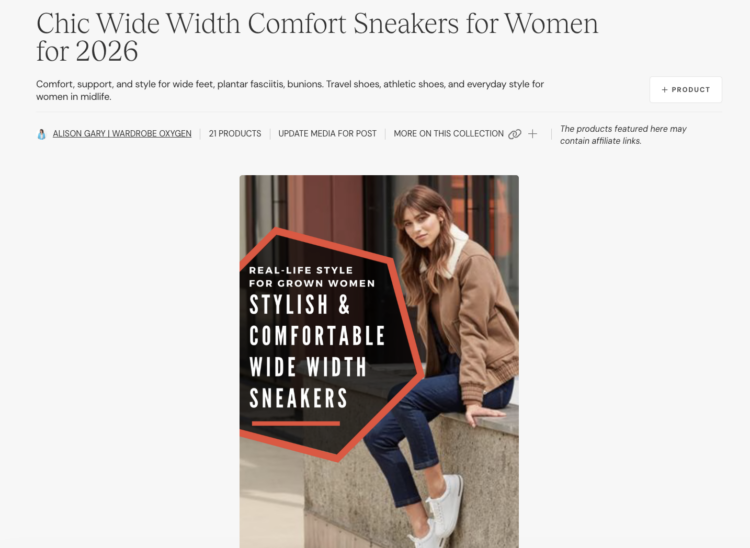
Now it's time to add products to this shelf. This can be done in a variety of ways:
- Tap the “Add Product” button to the right and you can add a non-affiliate link to affiliate-ize, you can search through links you have already made, or search links already in ShopMy.
- If you use links you already made, there is a pale gray “+quick add” in the lower right of each item; use that. Then you can add a bunch of items without having to go back to this screen. This is best if you are featuring the same item in multiple collections.
- If your item doesn't show, you can use the search field at top
- You can go to “Links” in your dashboard, search links you have already made, and add them individually or in bulk to an existing collection
- As you make links with the ShopMy bookmarklet, you can choose to add them to existing collections.
- I don't recommend more than 20 items in a collection. 12-15 IMO is the sweet spot.
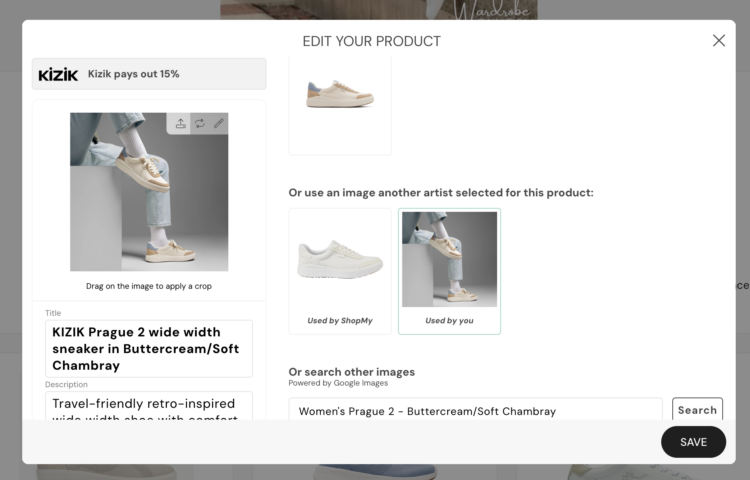
Once the items are in your shelf, you can continue to customize. Hover over each item and you will see icons for the link, a pencil, and three dots in the lower right corner, and three lines in the top right.
- The three lines let you hold and drag the item to move it around in the collection. The first five items show on a shelf, so always put the best at the top.
- The three dots let you delete, quickly move the item to the top, edit the item, duplicate it, or copy the link.
- The pencil lets you edit the item. This, IMO, is pretty useful. Change the name of the item. Add details why you recommend it. Even change the photo: you can pick one offered, find one on Google, or even upload one (could be a photo of you wearing it!).
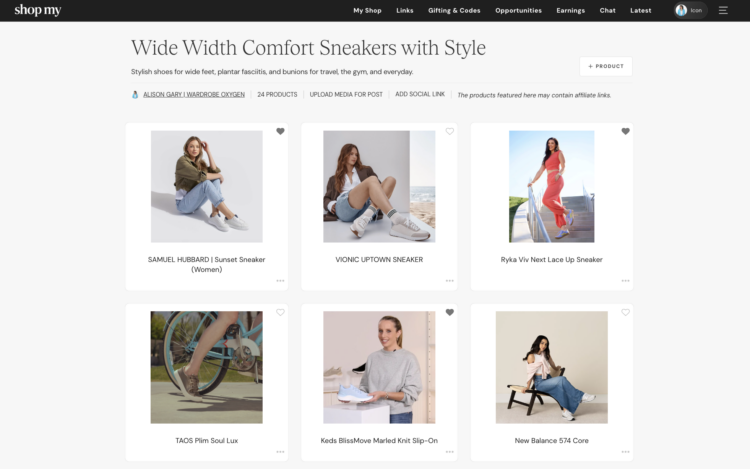
For example, for this shelf of the same shoes, but on a different tab/category, I updated all the titles to have the name of the shoe, and updated all the photos from the default to ones of humans wearing or at least holding the shoe. Now let me explain why I have two shelves of the same stuff…
How to Use ShopMy Shelves
There are a range of ways to use ShopMy shelves; below I share just a few that work for me:
Embeddable Components
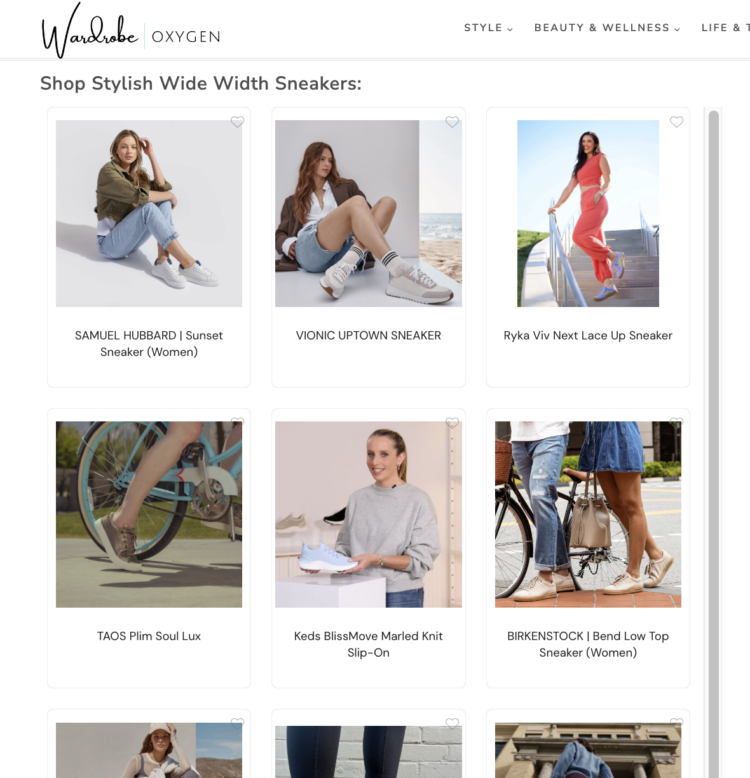
As I mentioned, I wrote a blog post about wide width comfort sneakers. In the blog post, I used ShopMy affiliate links for each individual product, but at the bottom of the post, I also have a “boutique” of the featured shoes. This was created using that shelf of people with the shoes. It gives a different perspective from the product photos throughout the blog post; I thought it added value. This “boutique” is the Full Collection Embed feature available for every ShopMy shelf.
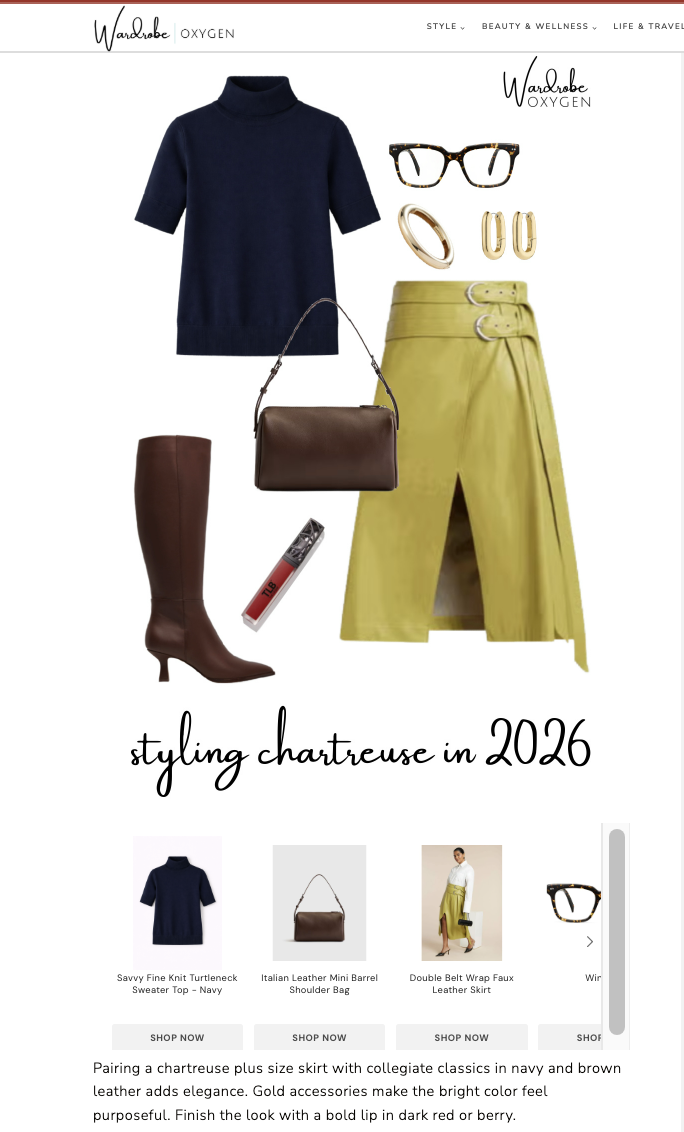
For a different blog post I wrote about how to style the color chartreuse, I made collages of outfits and below each one had a product carousel of the items in the collage. They were created using shelves I had pre-made in ShopMy. I uploaded the collages I made to ShopMy while writing the piece in my “Style Inspo” tab and linked the items. Here is the shelf for the outfit above.
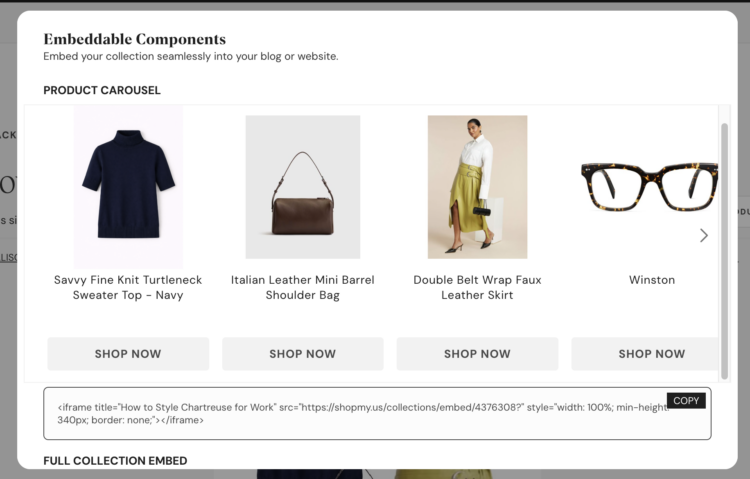
Both the “boutique” and the “carousel” were created using the Embeddable Components tool in ShopMy. At the top of each shelf is a a tab titled, “Settings & Sharing.” When you tap it, you will see tools to change the look and location of shelf, but also a tab titled “Embeddable Components.”
- Tap that and scroll down and you will find code for both the carousel and the full collection embed/boutique.
- In WordPress/Gutenberg, add an HTML block and drop in the code. You may wish to add <BR> at the end to have some space between it and the next piece of content; it depends on your site design.
- Any changes to your shelf will reflect in these embeddable tools; you can replace sold out items, add and delete without having to edit your blog post.
Shop the Post
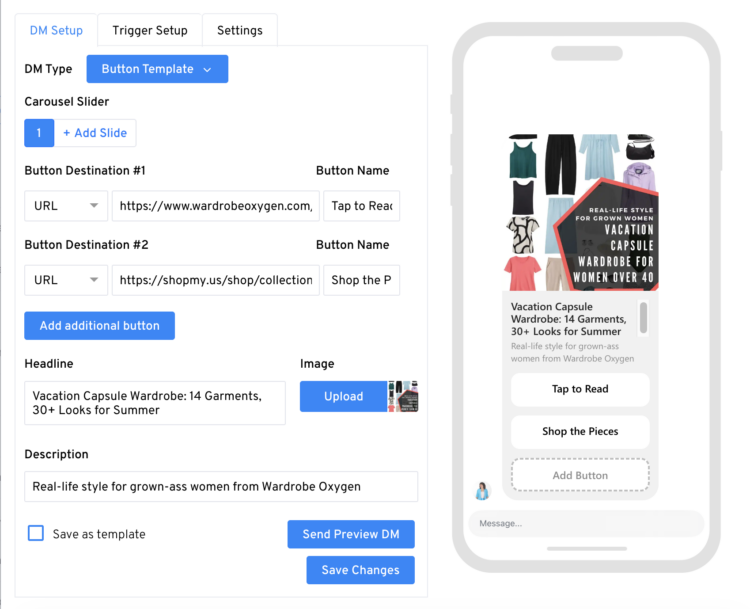
If you've been using a different platform that offers a super easy way to upload content in it then click a button to share on your Instagram, Facebook, or TikTok feed… ShopMy doesn't have that. But because it doesn't, you have more ability to customize and choose what to send, how to send it, and your audience doesn't have to download an app to access it.
- Plan ahead: if you know what you will be wearing or sharing in your content, create the shelf ahead of time. Make it a shelf, or upload a screenshot, collage, or photo of the content and add it to that photo.
- Use a tool like LinkDM or ManyChat to do the “comment X” work. I use LinkDM (free up to 1K DMs/mo; I use the paid option), but you choose what is best for you and your business.
I am finding I get more sales using this method with ShopMy versus LTK. However, everyone's audiences are different. If you have an audience that is comfortable with LTK and uses it regularly, that may be a better choice. I have an older audience, and I find many of them do not want to use another app and/or view my social content on laptops which ShopMy supports.
Added Value to Your Site
Are you an esthetician who has a list of products they constantly recommend? Are you a personal organizer who always uses the same bins, hangers, and labeling products? The ShopMy affiliate platform can work for your site, as well as for blogs like mine.
For my site, I have a “Shop Wardrobe Oxygen” tab in my top menu. If you go to it, you will see I have ShopMy embeddable components for a variety of categories. I have the same shelves on one tab/category in my ShopMy shop: Wardrobe Oxygen Essentials. Once a month, I update the content in these shelves and the updates immediately show up on my site.
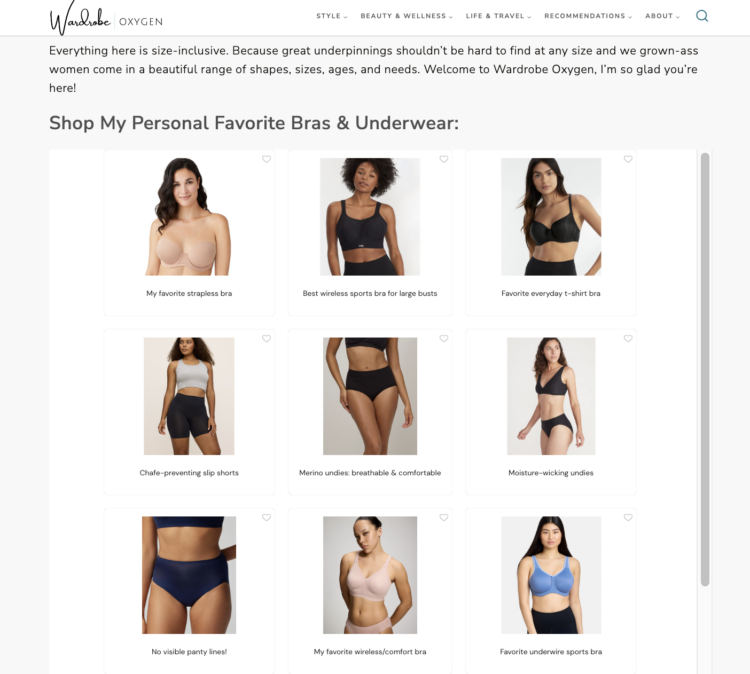
I also use ShopMy embeddable components on category landing pages. For example, I am a creator who sells a lot of bras and intimates. On my landing page for bras and intimates, I added a ShopMy embeddable component of my personal favorites. Note that I used the edit tools for each item to change the name to better describe why I included it. You can see the corresponding shelf at this link. Again, I update this regularly to ensure items are in stock, current colors, and my favorites at the top.
Okay, so now you've set up your shop and made some shelves. Let's get into the other features of ShopMy…
ShopMy Creator Tiers
ShopMy ranks their curators into tiers: Enthusiast, Ambassador, Trendsetter, and Icon. When you join, you are automatically an Enthusiast ShopMy Tier, and then you gain “points” based on how much you complete your account, how much you sell, how much you use ShopMy, and how many folks you recruit to join ShopMy.
- Folks push their referral link hard, but it only adds up to 20 of the 100 points to reach the top tier: Icon. And to even get points for referrals, your recruit needs to reach and maintain Ambassador level or higher. For reference, at the time of writing this I have recruited 8 curators, but of them, only one has hit or maintained status for me to get credits.
- Half of your points go to monthly order volume, which makes sense. This shows you know your audience, you link to the right things, and they are purchased from you.
- You get 10 points just for completing your profile. So before you get all gung-ho, do the work and set things up correctly.
- Full details about the ShopMy Tiers system, including an information video, can be found at this link.
I am an Icon with ShopMy. I am not saying that to boast, but because you cannot judge a book or a content creator by its cover or its social media numbers. On Instagram, I am a microinfluencer; to some I may even be considered a nanoinfluencer. But just as I preach with my content on this site, my audience is quality, not quantity. I have spent years building their trust, and it shows in my performance on ShopMy and other platforms.
The difference is ShopMy is the one where I am recognized for my success and not judged by how often I post or how many followers I have acquired. I can post on Instagram, and Facebook, and Pinterest, and Substack, on my blog, and in my newsletters. It doesn't matter, I am trusted to know what is best for my business and my audience. Speaking of being recognized for success…
Product Gifting at ShopMy
Gifting is one of the most popular aspects of ShopMy. You will be notified to visit the platform, where brands will offer a certain amount of items from a specific lookbook. The higher tier you are in ShopMy, the more gifting opportunities you receive.
You do not need (and I personally recommend you don't) accept every gifting opportunity. Respond promptly (this benefits your Tier ranking and is respectful to the brand), but if it's not a good fit and you wouldn't share such content regularly, decline. Other opportunities will come.
I began receiving great opportunities that fit the Wardrobe Oxygen community, but didn't fit my schedule. Realizing you can change the name and address for where these giftings go, I began offering them to my readers to do paid reviews for the site. You can see them at this link. If you have a team, you can easily send them items from ShopMy. Just remember to switch the name and address for the next gifting; I forgot and one of my readers (hi, Tiffany!) ended up with some lovely skincare, bras, and a water bottle!
Gifting does not mean you will build a relationship with the brand. Some brands will hound you asking you to share the product, others will never reply to your messages or recognize you mentioned them on social or made sales. Which leads to the next section…
Direct Chat with Brands
As soon as you join ShopMy you will begin to get direct messages from brands. Sometimes they use your name, sometimes they call you “lovely” or “dear,” but rarely are they actually personal. They thank you for your support and share they're on ShopMy, or maybe they let you know about a new product launch or a sale coming up that weekend. However, you cannot have conversations with these brands until you reach Trendsetter status.
And even then, they may not reply. Heck, you may get gifting or opportunities from them and still they may not reply. You can sell $25K worth of their product in one month and they still may not reply.
Other brands, you can chat with them like it's one of your besties in the DMs of Instagram. And others, they will begin to email you directly along with using the chat feature. There is no rhyme or reason to when it happens, but when it does, it's awesome.
You can test their level of communication by replying to their blast about a sale or launch. And if you do post about them, send them a link and/or screenshot in the chat. Again, they may never reply, or maybe they will and you two will build a beautiful business relationship together.
Paid Opportunities
Opportunities is one of my favorite aspects of ShopMy, and one of the things that made me a convert. Opportunities are when a brand reaches out and offer a flat fee/bonus for making X number of links and/or Y number of social mentions. Some of these opportunities also come with a lookbook for gifting. Again, not bragging, but for scale, I made more in Q1 on ShopMy opportunities than I did in all of 2025 on LTK collaborations and it took a helluva lot less work.
These opportunities are usually with brands you have already shown success with. It's not hard to share a few links to a favorite retailer, especially when they can be placed anywhere. I can put a link in my Facebook group, in my Instagram Story, on my blog, my newsletter, my Substack. It doesn't matter, as long as it gets the minimum number of clicks.
Mentions for opportunities are, at least for my account, focused on Instagram (Stories or in-feed). These occasionally are just “@” mentions, other times a visible hashtag is also required and this is clearly explained before accepting. No need to upload content; the ShopMy platform tracks it on your behalf.
Some of these bonuses are instant payouts, some are a 90-day payout. This is clearly stated before accepting the opportunity. And just like gifting, you do not need to accept every opportunity. If it's not a good fit, say no, other opportunities will come your way, especially if you perform well with the ones you accept. Which leads us to the next section…
ShopMy Transparency
The #1 reason why I love ShopMy? The transparency. I've been working with affiliate platforms for two decades and have never seen anything this clear, easy to follow, and honest.
- You can turn on analytics on your Shop and see how many views of your shop, and each individual shelf and collection. You can also see at a quick glance how much money you have made from each collection.
- FYI, views and revenue for these is from the shop, but also the embeddable components. It's really nice to be able to see how many people shopped those components versus individual links to help tailor future blog posts and landing pages.
- On the “Links” tab of your dashboard, you can see easily how many clicks and orders you got from each link and how much you earned in commission. No need to download a .csv (though you can if you want), it's right there on your desktop and also in the app and you can have ascending or descending order for any of the factors, search by time period, and narrow by brand.
- On the “Earnings” tab you can clearly see your Tier, upcoming payment, pending payments, how much you've been paid, and lifetime earnings. Scroll down, and it breaks down revenue by month, individual items sold, referral commissions, completed opportunity rates and if they've been paid out, and more.
- For each opportunity you accept, you have a dashboard showing what is left to complete it, how many clicks you've gotten on the links, how many views on social mentions, and how much you sold. It's fun to see the results of your work; I've never seen it so clearly before with other platforms.
- Within the app, when you chat with a brand, right at the top you can see how much you have sold for them. That, IMO, is badass.
- From what I have heard from those I know on the brand side, they too have far more transparency with ShopMy.
Issues with ShopMy
I have had no issues with ShopMy, but again, my business is likely different from yours.
I am okay with a delayed payout; I've been doing this job so long the income is pretty consistent. Wardrobe Oxygen is set up as an S-Corp so I pay myself a monthly salary based on my last year's revenue.
I haven't had issue with missing commissions, but honestly I don't follow them super hard. I know that commissions get dismissed and reversed for a range of reasons, and a lot of brands will not let you use your own affiliate links. Also, for my brand, I rarely link to the retailers that are known for different commissions on different departments for different circumstances.
I have heard folks had their shops shut down without notice. However, from digging in further, I have found that some of these folks went against the ShopMy terms and conditions. It's important to read these T&Cs; for example if you share a promo code offered to you through ShopMy on a site like RetailMeNot, they can kick you out. If they know you are sharing your commissions, conversations with brands, or any other private data, they can kick you out.
I had one issue where my qualifying links for a paid opportunity weren't showing up in the dashboard. I contacted ShopMy and ended up in an AI hole of frustration. I then made a screenshot of the link details from my “Links” tab, sent the screenshot to the brand I was working with, and they fixed it on their end.
I do not have a rep or consultant with ShopMy. I don't know if others do, but I don't feel I really need one. I have one with LTK, but in my almost decade with that company (FKA rewardStyle), I only had one rep who offered me truly personalized support and within a year she was promoted higher up in the company. Again, my business and experience is likely different from yours.
YMMV
I know I've written this many times, but I must reiterate, every creator's business, focus, needs, and experience is different. Your mileage with ShopMy may vary, hell the way you use it can be drastically different than me and you're going to leave a comment saying I got it all wrong. But that's the beauty of this wacky job of ours: we make it ours, on our terms.
A rising tide lifts all ships. There is enough pie for everyone in the creator world. The more informed we all are, the more likely the truly talented creators succeed. I hope you found this beneficial, and I hope you get the success you deserve.
Questions I've Been Asked About ShopMy
Since I started talking about ShopMy on Threads and Substack, my DMs have been full of questions. Here are the ones that come up most often:
Do you need a lot of followers to join ShopMy?
No, and this is one of the things I love most about it. ShopMy is built around sales and engagement, not follower counts. I am a microinfluencer on Instagram by most definitions, and at ShopMy I am an Icon, their top tier. If you have an engaged audience who trusts your recommendations, ShopMy is designed to recognize and reward that.
How is ShopMy different from LTK?
I still use both, and they serve different purposes in my business. LTK has a built-in shopper app and audience; some of my readers have been using it for years and are comfortable there. ShopMy gives me more transparency, more direct brand relationships, and more flexibility in how and where I share links. If your audience skews older or you have a blog- or Substack-first business like mine, you may prefer ShopMy.
How do you get a referral to join ShopMy?
You need a referral from an existing ShopMy creator. I share mine not just because I may earn a commission if you do well, but because I truly think it's a good platform for the right kind of creator. However, I'd rather you use the link of someone whose work you respect as a small thank you to them.
Do you make more money on ShopMy than LTK?
For my business, yes, and significantly so in 2025 and into 2026. But I want to be careful about making that a blanket statement, because every creator's audience is different. What I can say is that the Opportunities feature alone has changed what paid brand work looks like for me: less performance pressure, more aligned partnerships, and clearer and faster payouts.
Is ShopMy worth it if you're just starting out?
Honestly, it depends on what “just starting out” means for you. If you're brand new to content creation and building an audience from scratch, I'd focus on that first. But if you've been creating for a while, have an engaged readership or following, and feel like you're being ignored or undervalued on other platforms then yes, ShopMy is worth exploring.
What's the catch with ShopMy?
The payout timeline can be slow (commissions are brand-specific but up to 90 days), and customer support leans heavily on AI, which I found frustrating the one time I needed help. Also, if you're used to the built-in social sharing tools on LTK, ShopMy's approach is more manual and may require additional tools. But for me, I'd argue that's actually a feature, not a bug, because I find it gives you more control.

Did you like what you just read?
Consider tapping here to buy me a coffee in thanks. The best gift you can give a content creator is the gift of sharing. Consider sharing this article on Facebook or Pinterest. Thank you so much for your support!





I have some questions/comments as a consumer, not as a content creator.
1) I appreciate that unlike LTK, ShopMy isn’t constantly pushing me to use an app. I find lots of apps difficult to use/don’t use them often enough to justify the memory.
2) is it better for you if we shop using the promo codes on your website or thru ShopMy? For instance, I shop at Talbots a lot. but rather than search for a blog post that features Talbots, I just go to your recommendations, find Talbots, & click on it. Which is usually not until I’m ready to check out.
3) your menu bar in ShopMy with Capsule, IG, Shop the blog, etc. That’s nice. HOWEVER, I didn’t know about it until I read this post & I had a hard time, too hard a time, finding it. That’s on ShopMy. Like so many other social media/whatever things, it doesn’t want to let you just look at what want to look at. It’s pushing other content creators in your circle (& i HATE how it pushes you to create a circle. can we stop with the jr high crap? All I want is an alphabetical list of creators I follow.) which clogs up what you’re looking for. But then, my ideal organization is a card catalog/library stacks. I did finally get to the categories you created. but goodness knows if I could find them right off the bat the next time. I hope I do, because I think it will help ShopMy stop being the current overwhelming, unorganized mess of pictures I see.
1. Not needing the app is another favorite; I have heard you all loud and clear that you aren’t interested in another app and I get it.
2. Both work! You can use a link from my ShopMy, from a blog post, from my Where I Shop page (https://www.wardrobeoygen.com/where-i-shop/) and they all benefit me. Whatever works for you is best!
3. I don’t love that the default is to see what has recently been linked and the circle thing. I get that some folks love the idea of a circle, and I have made a few circles myself, but it is a very specific kind of shopping for a very specific customer. Like, you can make a circle of the beauty creators you follow and then you can see what they and no one else is promoting, but again, that’s a specific shopping style. I have a button in my sidebar for my ShopMy; I can also put one in the menu at the top under “Recommendations.” If you see how another person is organizing or sharing it and it makes sense to you, let me know as I am happy to learn new ways to use this tool to best serve you!
I have really enjoyed moving over to ShopMy. I still have all my old links with LTK but I like how ShopMy is so much more personal and not all about pushing volume of posting. I have a day job, certain times of the year I don’t have bandwidth for my Blog/Newsletter. Other times I have lots of time to post. Thanks for sharing the embeddable details! I will have to experiment with that. I do find that there are more non US brands that are signed up with ShopMy which I love. I have had more success to linking to more of what I naturally shop.
Same, I appreciate the diversity of brands with ShopMy. I find a lot more smaller businesses, non-US brands as you mentioned, and atypical sites not focused just on fashion/beauty/wellness/home.